# helder.
**A dark desktop workbench for developers who build with Claude Code.**
See what the agent changes, while it changes it — then hand it back exactly the line you mean.
[](#download)
[](https://electronjs.org)
[](https://react.dev)
[](https://typescriptlang.org)
[](#development)
[](#fully-vibe-coded)
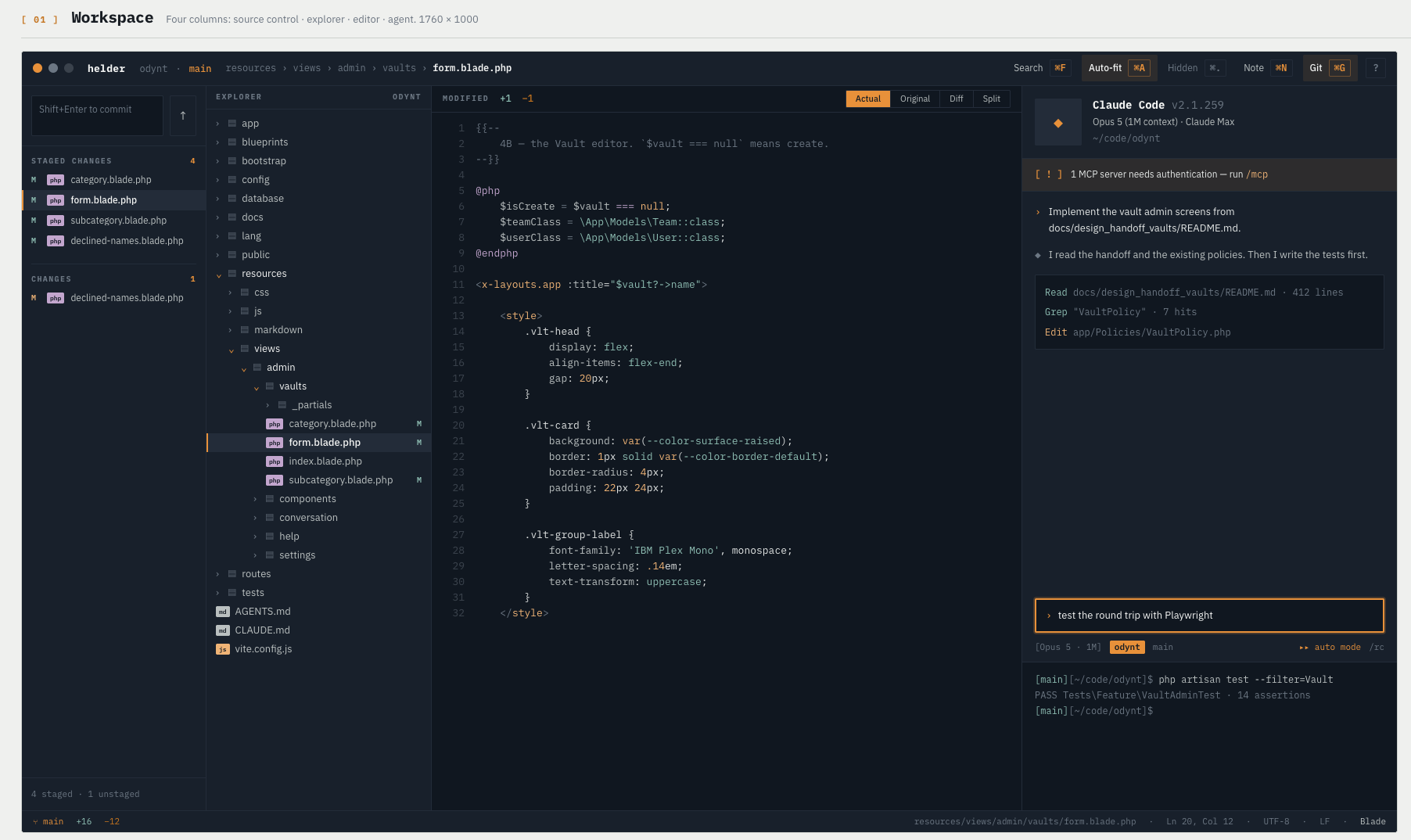
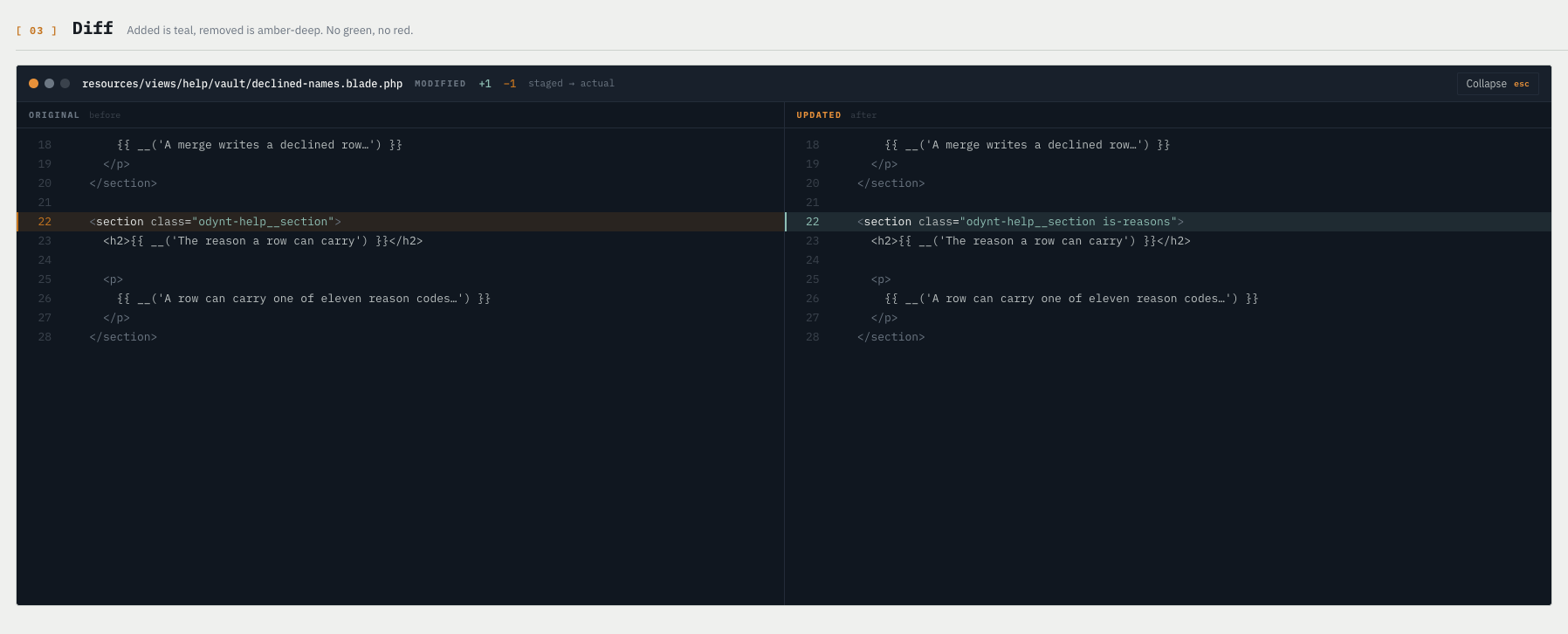 ### Git, in the columns you already read
The Source Control column is a working git client for the review loop:
- Stage and unstage a single file, or the whole list.
- Write a commit message and commit with `⌘↵`.
- Discard a file back to `HEAD`, behind a confirmation.
- Push the current branch with `⌘P`.
- Watch `+/−` counts update as the agent writes.
Pull, fetch and branch switching stay out of scope. Helder reviews what the agent did; it does not manage your remotes.
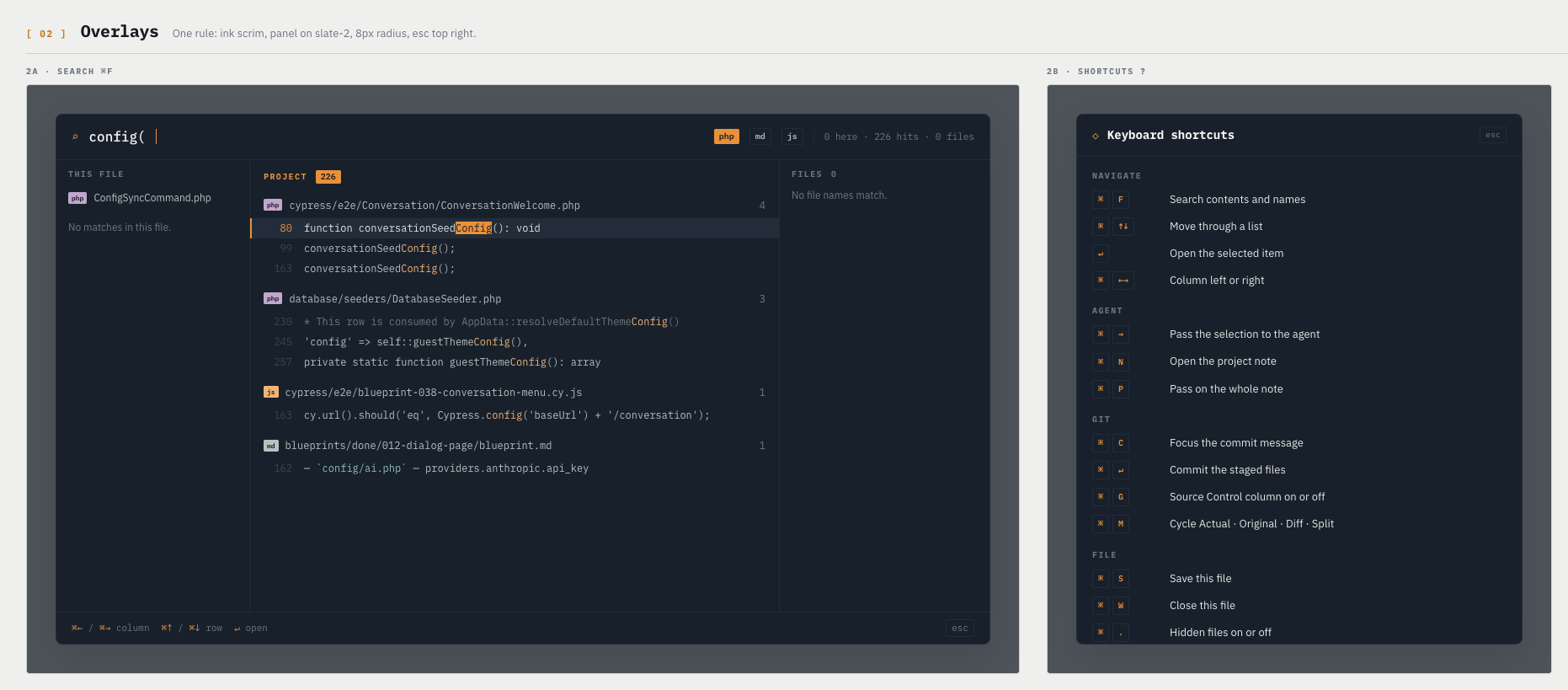
### One search for everything
`⌘F` opens a single overlay that searches file **contents** and file **names** at the same time. Content matches come from ripgrep on the left, fuzzy name matches on the right. There is deliberately no second "go to file" command to remember.
### Git, in the columns you already read
The Source Control column is a working git client for the review loop:
- Stage and unstage a single file, or the whole list.
- Write a commit message and commit with `⌘↵`.
- Discard a file back to `HEAD`, behind a confirmation.
- Push the current branch with `⌘P`.
- Watch `+/−` counts update as the agent writes.
Pull, fetch and branch switching stay out of scope. Helder reviews what the agent did; it does not manage your remotes.
### One search for everything
`⌘F` opens a single overlay that searches file **contents** and file **names** at the same time. Content matches come from ripgrep on the left, fuzzy name matches on the right. There is deliberately no second "go to file" command to remember.
 ### The project note
`⌘N` opens a note that belongs to the project. Collect the things you want to tell the agent while you read. `⌘P` passes the whole note into the agent's input in one go.
---
## Keyboard
Press `?` in the title bar for the full list.
| Key | Action |
|---|---|
| `⌘F` | Search contents and names |
| `⌘→` | Pass the selection to the agent |
| `⌘N` · `⌘P` | Open the project note · pass the whole note |
| `⌘M` | Cycle Actual · Original · Diff · Split |
| `⌘C` · `⌘↵` | Focus the commit message · commit the staged files |
| `⌘P` | Push the current branch |
| `⌘S` | Save this file |
| `⌘G` · `⌘L` · `⌘.` | Source Control on or off · fluid columns · hidden files |
| `⌘O` · `⇧⌘O` | Open a project folder · open a recent project |
| `⌘←→` · `↑↓` · `↵` | Move between columns · move the row cursor · open the row |
---
## Fully vibe coded
Helder is **100% vibe coded**. Every line comes out of Claude Code sessions: the design board, the Electron main process, the React renderer, the 155 tests, the packaging scripts and this README. A human set the direction and judged the app from the outside — does it do the right thing, does it feel right. A human did not type the source.
**Nobody read the code.** There is no line-by-line review behind this repository. The guarantees are narrower than that: the test suite passes, typecheck and lint pass, and the app runs daily on real projects. Treat everything else as unverified.
That is also why the app exists. The workflow needed a tool, so the workflow built one.
---
## Configuration
Settings are per project, in a `.helder/` folder in the project root.
| File | Role |
|---|---|
| `config.json` | Your overrides only. Sparse |
| `config.default.json` | Every default, rewritten on each launch as live documentation |
| `theme.css` | A theme over the built-in dark one. The code font and size live here |
An effective value comes from `config.json` when it is present, otherwise from `config.default.json`, merged key by key. A watcher reloads both while the app runs.
There is no light mode and no theme toggle. That is a decision, not a gap.
---
## Development
Node 18 or later, and `git` on your `PATH`.
```bash
npm install # rebuilds node-pty for Electron (postinstall)
npm run dev # launch with hot reload
```
Helder opens one project per window, by default the working directory. Click the project name in the title bar to open another, or start with `HELDER_PROJECT=/path/to/repo npm run dev`.
| Command | What it does |
|---|---|
| `npm run dev` | Launch in Electron with HMR |
| `npm run build` | Production build into `out/` |
| `npm test` | The vitest suite |
| `npm run lint` | ESLint |
| `npm run typecheck` | `tsc --noEmit`, renderer and main |
| `npm run rebuild` | Rebuild `node-pty` when a terminal says "PTY unavailable" |
Keep typecheck, lint, test and build green together. The build uses esbuild and does not type-check, so run `typecheck` on its own.
### Package a release
```bash
./sync_helder.sh # macOS: build, install into ~/Applications, copy the DMG
npm run build && npx electron-builder --win -c.npmRebuild=false # Windows, cross-built from macOS
```
The Windows build needs `node_modules/@vscode/ripgrep-win32-x64`, which npm refuses to install on macOS. Extract it by hand once; `npm ci` removes it again.
---
## Architecture
| Layer | Choice |
|---|---|
| Shell | Electron 31, main + renderer + preload bridge (`contextIsolation: true`) |
| Renderer | React 18, TypeScript, Vite through `electron-vite` |
| Highlighting | Prism 1.29 |
| Filesystem | `fs` + `chokidar` v3, in the main process |
| Git | `simple-git`, in the main process |
| Terminals | `node-pty` + `xterm.js` |
| Search | ripgrep for content, a fuzzy matcher for names |
| Type | IBM Plex Mono for code and labels, IBM Plex Sans for the interface. Both bundled |
**The one rule:** the renderer never touches the filesystem, git or a PTY. Everything crosses the preload bridge over IPC. Break that and the app stops being safe to run against a real repository.
```
src/
main/ window, IPC, services (fs · git · pty · search · config · logger)
preload/ the contextIsolation bridge — the only renderer↔OS surface
renderer/ React UI: App, editor, terminals, overlays, project store, helpers
test/ vitest — diff, fuzzy, highlight, config, fs, git, grouping, UI
docs/design/ the design board, tokens and screens at real pixel size
DESIGN.md functional spec: every panel, state and interaction
CLAUDE.md architecture notes and the traps, for the next agent session
```
`docs/design/README.md` is the visual source of truth. `DESIGN.md` is the behavioural one.
---
## License
TBD.
### The project note
`⌘N` opens a note that belongs to the project. Collect the things you want to tell the agent while you read. `⌘P` passes the whole note into the agent's input in one go.
---
## Keyboard
Press `?` in the title bar for the full list.
| Key | Action |
|---|---|
| `⌘F` | Search contents and names |
| `⌘→` | Pass the selection to the agent |
| `⌘N` · `⌘P` | Open the project note · pass the whole note |
| `⌘M` | Cycle Actual · Original · Diff · Split |
| `⌘C` · `⌘↵` | Focus the commit message · commit the staged files |
| `⌘P` | Push the current branch |
| `⌘S` | Save this file |
| `⌘G` · `⌘L` · `⌘.` | Source Control on or off · fluid columns · hidden files |
| `⌘O` · `⇧⌘O` | Open a project folder · open a recent project |
| `⌘←→` · `↑↓` · `↵` | Move between columns · move the row cursor · open the row |
---
## Fully vibe coded
Helder is **100% vibe coded**. Every line comes out of Claude Code sessions: the design board, the Electron main process, the React renderer, the 155 tests, the packaging scripts and this README. A human set the direction and judged the app from the outside — does it do the right thing, does it feel right. A human did not type the source.
**Nobody read the code.** There is no line-by-line review behind this repository. The guarantees are narrower than that: the test suite passes, typecheck and lint pass, and the app runs daily on real projects. Treat everything else as unverified.
That is also why the app exists. The workflow needed a tool, so the workflow built one.
---
## Configuration
Settings are per project, in a `.helder/` folder in the project root.
| File | Role |
|---|---|
| `config.json` | Your overrides only. Sparse |
| `config.default.json` | Every default, rewritten on each launch as live documentation |
| `theme.css` | A theme over the built-in dark one. The code font and size live here |
An effective value comes from `config.json` when it is present, otherwise from `config.default.json`, merged key by key. A watcher reloads both while the app runs.
There is no light mode and no theme toggle. That is a decision, not a gap.
---
## Development
Node 18 or later, and `git` on your `PATH`.
```bash
npm install # rebuilds node-pty for Electron (postinstall)
npm run dev # launch with hot reload
```
Helder opens one project per window, by default the working directory. Click the project name in the title bar to open another, or start with `HELDER_PROJECT=/path/to/repo npm run dev`.
| Command | What it does |
|---|---|
| `npm run dev` | Launch in Electron with HMR |
| `npm run build` | Production build into `out/` |
| `npm test` | The vitest suite |
| `npm run lint` | ESLint |
| `npm run typecheck` | `tsc --noEmit`, renderer and main |
| `npm run rebuild` | Rebuild `node-pty` when a terminal says "PTY unavailable" |
Keep typecheck, lint, test and build green together. The build uses esbuild and does not type-check, so run `typecheck` on its own.
### Package a release
```bash
./sync_helder.sh # macOS: build, install into ~/Applications, copy the DMG
npm run build && npx electron-builder --win -c.npmRebuild=false # Windows, cross-built from macOS
```
The Windows build needs `node_modules/@vscode/ripgrep-win32-x64`, which npm refuses to install on macOS. Extract it by hand once; `npm ci` removes it again.
---
## Architecture
| Layer | Choice |
|---|---|
| Shell | Electron 31, main + renderer + preload bridge (`contextIsolation: true`) |
| Renderer | React 18, TypeScript, Vite through `electron-vite` |
| Highlighting | Prism 1.29 |
| Filesystem | `fs` + `chokidar` v3, in the main process |
| Git | `simple-git`, in the main process |
| Terminals | `node-pty` + `xterm.js` |
| Search | ripgrep for content, a fuzzy matcher for names |
| Type | IBM Plex Mono for code and labels, IBM Plex Sans for the interface. Both bundled |
**The one rule:** the renderer never touches the filesystem, git or a PTY. Everything crosses the preload bridge over IPC. Break that and the app stops being safe to run against a real repository.
```
src/
main/ window, IPC, services (fs · git · pty · search · config · logger)
preload/ the contextIsolation bridge — the only renderer↔OS surface
renderer/ React UI: App, editor, terminals, overlays, project store, helpers
test/ vitest — diff, fuzzy, highlight, config, fs, git, grouping, UI
docs/design/ the design board, tokens and screens at real pixel size
DESIGN.md functional spec: every panel, state and interaction
CLAUDE.md architecture notes and the traps, for the next agent session
```
`docs/design/README.md` is the visual source of truth. `DESIGN.md` is the behavioural one.
---
## License
TBD.